
The Figma design agent has been free since the beta started in May. For the teams I talk to, it has grown the way free things usually grow: unevenly, and with nobody owning it. A few people use it all day, most tried it twice, and somebody has already published an internal generative plugin that half the team now depends on.
That’s fine while you’re exploring. It’s a bad place to start a budget from. Figma has said the agent in Figma Design moves from open beta to general availability (GA) on October 6, 2026. From then on it draws AI credits from the same pool as Figma Make and every other paid AI feature. So there are a few days to turn an informal beta into a process someone manages.
This is the audit I’d run in these few days. It answers three questions: which tasks earn their credits, what the agent will actually cost, and who owns the tools it produces.
What actually changes on October 6
Here are the facts, taken from Figma’s own documentation. My opinions come after.
- Same pool, variable price. Once the agent is GA it works “like Figma’s other agentic AI features.” Credit usage varies with how complex the prompt is, which actions the agent takes, and what context you give it, such as connected libraries or attached files. Figma has not published per-task agent costs yet. It has said it will update its How AI credits work article when it does.
- Seat credits are personal. Every seat gets a monthly allocation. It resets monthly, doesn’t roll over, and can’t be shared or transferred to anyone else. Beyond that, admins can buy a subscription pool, turn on pay-as-you-go up to a monthly spending limit, or do both. When both are on, subscription credits are used first.
- Add-ons got bigger on August 25. Existing subscriptions and pay-as-you-go now buy 2x more credits on Professional and 1.6x more on Organization and Enterprise, at the same price. Seat credits didn’t change.
- Admins can set limits per person: full access, a custom monthly limit, or no access to paid credits.
For a sense of scale, Figma’s published examples for Make on its default model (as of February 2026) are roughly 30+ credits to change a font, 75+ to make a design interactive, and 100+ to generate an app from scratch. The agent isn’t Make, so don’t copy those numbers into a spreadsheet. They do show how agentic pricing behaves: more actions and more context cost more.
Step 1: Inventory what the beta was actually used for
You can’t decide what to delegate until you know what people are already delegating. Since June 23, new agent chats in a file are visible by default to Full-seat editors of that file. So you already have a partial audit trail.
Take a sample of active files, read the chat histories, and tag each request by task type. Use your own labels; mine are usually cleanup, content fill, variants, documentation, exploration and new UI. Count how often each type comes up and roughly how much rework followed.
This is the same exercise as a design system adoption audit, and it tells you the same kind of thing. When I led the design system for an oil and gas monitoring platform, the useful signal was rarely what people built. It was where they detached components and worked around the system, because that’s where the system was failing them. Agent chats work the same way. A cluster of “rebuild this table with our components” prompts is a gap in your library, even if the usage dashboard calls it productivity.
Step 2: Decide which tasks are worth delegating
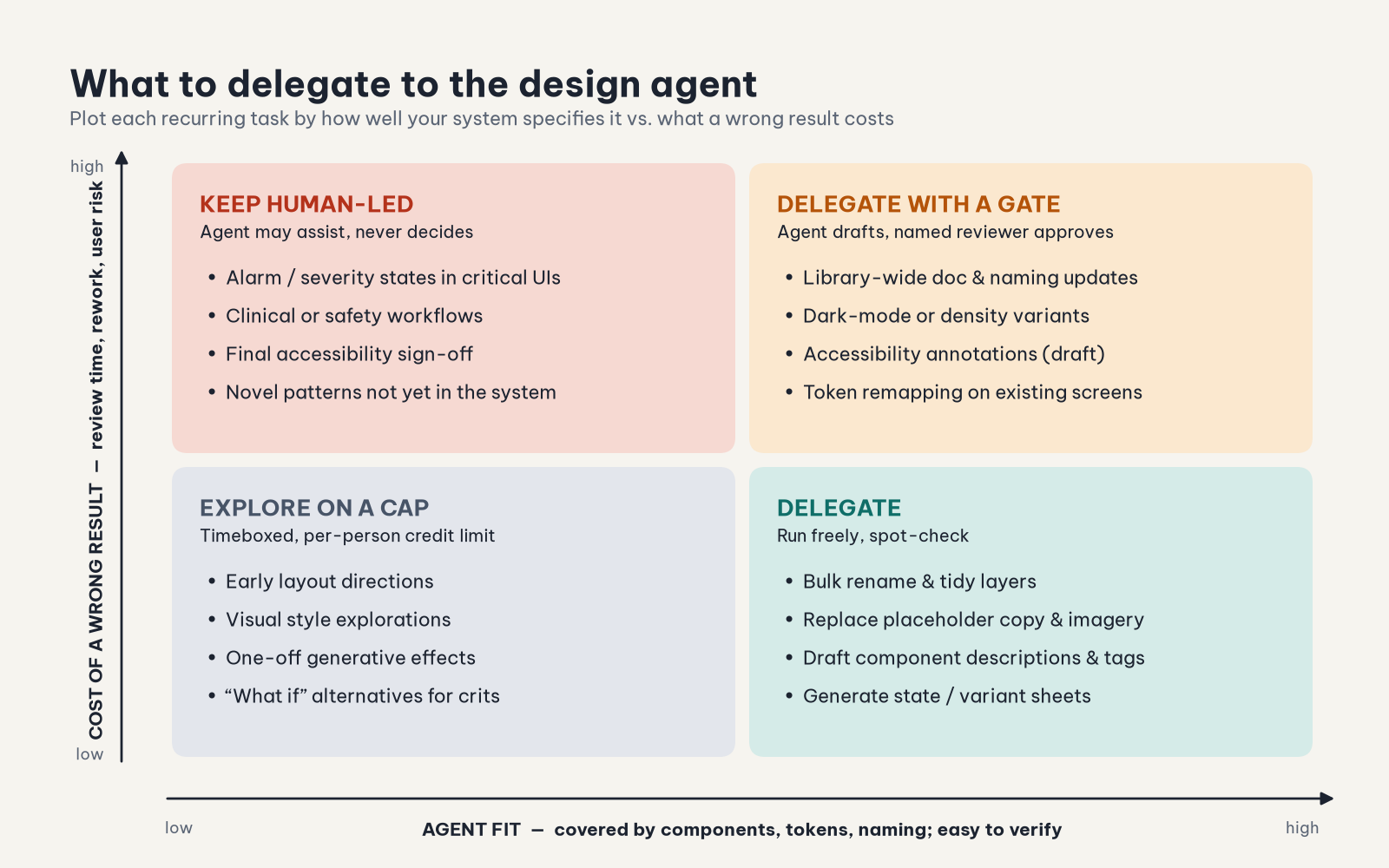
I sort every recurring task on two axes.
Agent fit is how fully your components, tokens and naming conventions describe the task, and how easily a human can check the result. Cost of a wrong result covers review time, rework, and the risk to end users if a mistake ships.
- Delegate: high fit, low cost. Bulk renaming, replacing placeholder copy and imagery, drafting component descriptions, generating state sheets. Figma’s own launch post leans into these design-system chores, and in my view that’s where the agent is strongest.
- Delegate with a gate: high fit, high cost. Library-wide documentation changes, dark-mode or density variants, token remapping, draft accessibility annotations. The agent drafts, and a named reviewer approves before anything merges.
- Explore on a cap: low fit, low cost. Early directions and style explorations. These are useful, but this is where spend balloons, so put them under a per-person limit.
- Keep human-led: low fit, high cost. In healthcare and industrial monitoring this quadrant isn’t small. Alarm severity states, clinical workflows and final accessibility sign-off fall here. A “convert to dark mode” pass can produce colors that pass contrast checks and still mean the wrong thing. On a monitoring screen, a severity color that drifts is a safety issue, not a style nit.
One rule of thumb I hold firmly: the real price of an agent task is credits + review time + rework. Credits are usually the smallest of the three. A task that’s cheap in credits but needs a senior designer to untangle the output is expensive.
Step 3: Forecast from beta data, not vibes
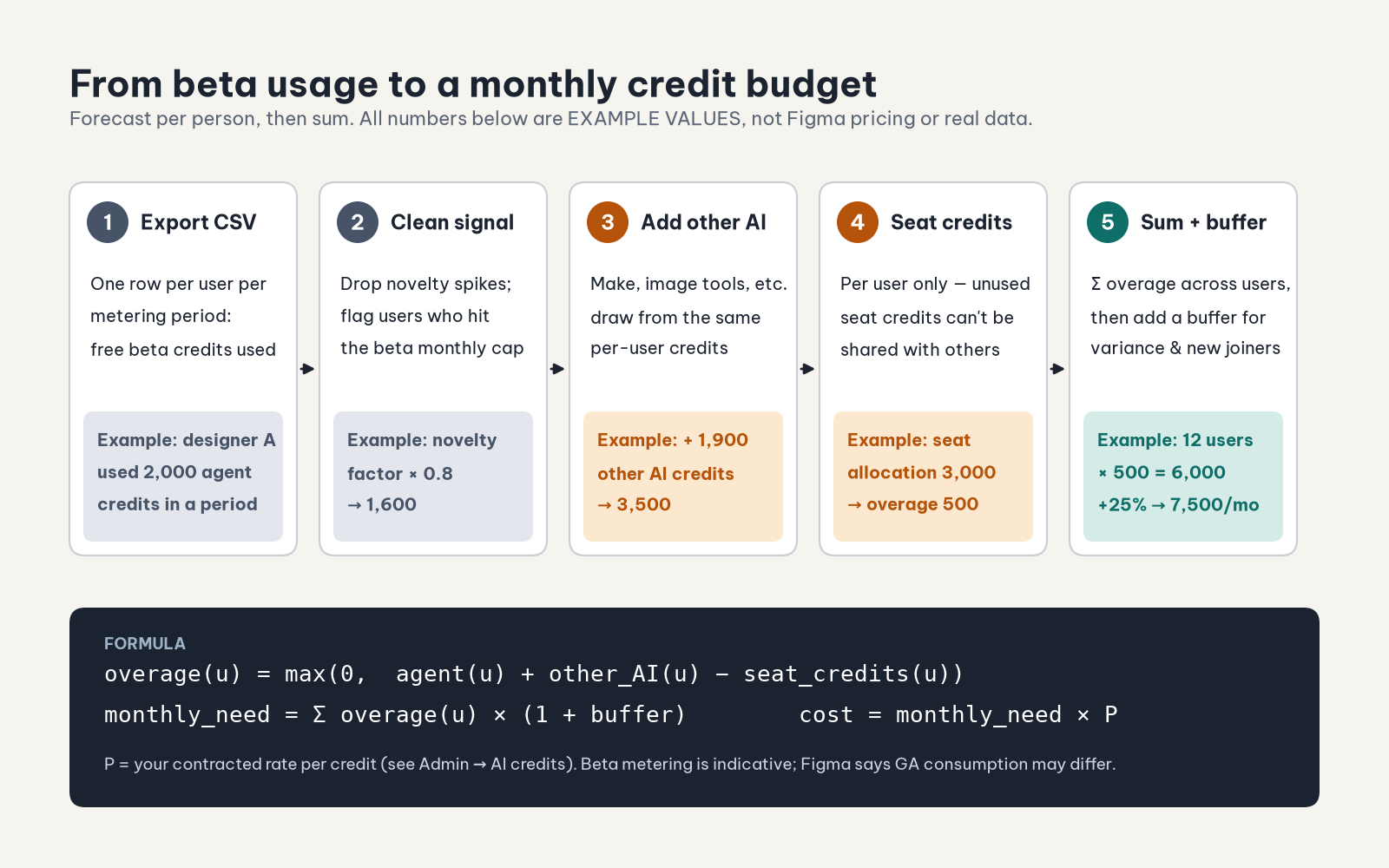
On Organization and Enterprise plans, Figma lets admins download a CSV of free beta usage (Admin → AI credits → hover “Credits used in beta not included” → Download CSV). It has one row per user per metering period, with free beta credits used (total and by product), credit allowance, and billing group. Figma itself warns that GA consumption depends on many factors and may change. Treat the CSV as a baseline, not a quote.
Make three corrections before you trust it:
- Forecast per person, not per team. Seat credits can’t be pooled. If you add up the whole team’s usage and subtract the whole team’s seat allocation, you’ll underestimate overage: unused credits from light users never cover heavy users.
- Watch for censored data. The beta had its own monthly usage limits. Anyone who hit the cap shows the cap, not their real demand, so flag those rows.
- Add everything else. The agent will share credits with Make, image tools and other paid features. Agent usage alone isn’t the forecast.
The formula I use:
overage(u)   = max(0, agent(u) + other_AI(u) − seat_credits(u))
monthly_need = Σ overage(u) × (1 + buffer)
cost         = monthly_need × P
Worked example (illustrative values only, not real data or Figma pricing): a designer used 2,000 agent credits in a beta period. A novelty correction of ×0.8 brings that to 1,600. Adding 1,900 credits of other AI use gives 3,500. Subtracting a 3,000-credit seat allocation leaves 500 of overage. If 12 people look like that, you need 6,000 credits a month, or 7,500 with a 25% buffer. P is your contracted rate, which you’ll find in the admin dashboard. Don’t take it from a blog post.
Then pick the purchasing shape. A subscription covers the baseline you can predict. Pay-as-you-go with a spending limit covers variance. Professional teams don’t get the CSV, so run a two-week manual log of agent sessions before GA.
Step 4: Treat generative plugins and shaders as design-system assets
On September 1, Figma added publishing for generative plugins and shaders made with the agent, to the Community or privately to your organization on Organization and Enterprise plans. It also added access to view and download their code, and MCP support for viewing and changing them, including exporting shaders to React. Since June, teams have also been able to publish agent skills to each other.
Once something is published internally, it’s a dependency. A “quick table generator” one designer made on a Tuesday becomes the way forty screens got built. If it produces off-token spacing or inaccessible markup, those problems spread exactly the way a bad component does. So govern it like one.
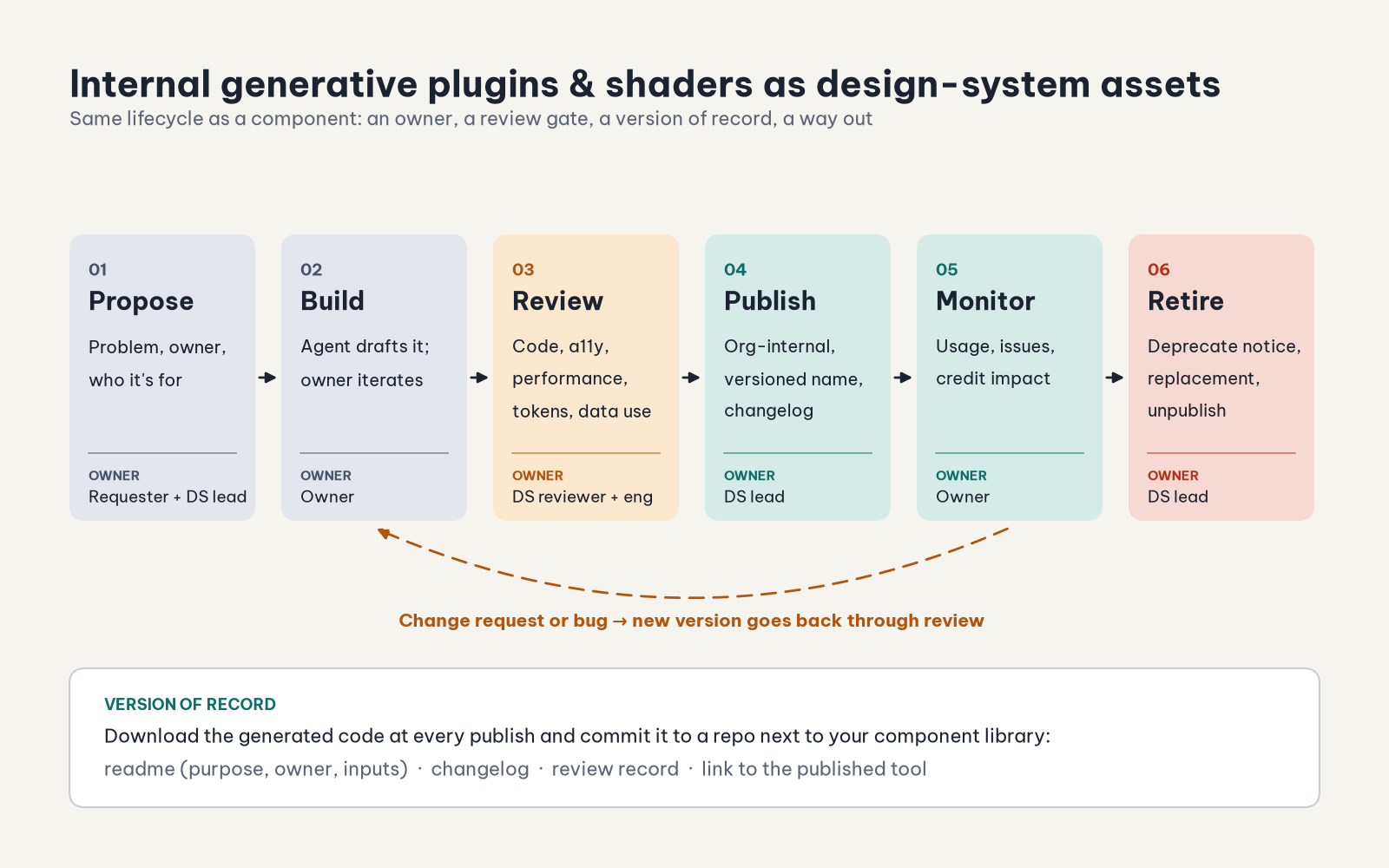
- Owner: one named person per tool. “The team” doesn’t count.
- Review: look at the code (you can now download it), check accessibility and token usage, and check performance. Shaders are GPU programs, so test them on the hardware your team actually has.
- Version of record: I don’t rely on in-tool history for anything people depend on. At every publish I download the code and commit it to a repo next to the component library, with a readme, a changelog and the review notes.
- Retirement: announce deprecation, point people to the replacement, then unpublish. A tool nobody owns should be retired, not tolerated.
Skills need the same treatment. A published skill is a prompt that everyone runs, which makes it policy. Review it like one.
Step 5: Put the guardrails in before the meter starts
Set per-person limits based on the quadrant people mostly work in, not on seniority. Use billing groups where team budgets differ. Set a pay-as-you-go cap that you’d be comfortable explaining to finance. When someone hits a limit, Figma shows a “Request more” option that notifies the admin. Treat those requests as data: repeated requests from one workflow mean you should either fund it or fix it.
The pre-GA checklist
- Export the beta CSV (Org/Enterprise), or start a two-week manual log (Professional)
- Sample agent chat histories and tag requests by task type
- Map recurring tasks onto the delegation matrix; name a reviewer for every “gate” task
- Forecast per person: agent + other AI − seat credits, flag capped users, add a buffer
- Choose a subscription baseline and a pay-as-you-go spending limit
- Set per-person or billing-group limits before October 6
- Inventory published internal plugins, shaders and skills; give each one an owner
- Commit the code of every internal generative tool to a repo with a changelog
- Write a one-page “how we use the agent” guide that includes the human-led quadrant
- Book a 30-day post-GA review comparing forecast with actual usage
The point
A free beta tells you what people are curious about. Paid usage tells you what they value. The gap between the two is where budgets get blown and design systems slowly rot. I’d rather close that gap on purpose now, before GA, than explain it to finance in November.
Sources
- Figma Help Center: AI credit updates FAQ
- Figma Help Center: How AI credits work
- Figma Help Center: Manage AI credits
- Figma Help Center: Set AI credit limits
- Figma Help Center: Work with the Figma agent in design files
- Figma Blog: Behind the build: Generative plugins and shaders at Figma (Sep 1, 2026)
- Figma Blog: Figma’s design agent, now with custom tools and greater context (Jun 24, 2026)
- Figma Blog: The Figma design agent is here (May 20, 2026)